pharmacy management system
A downloadable tool
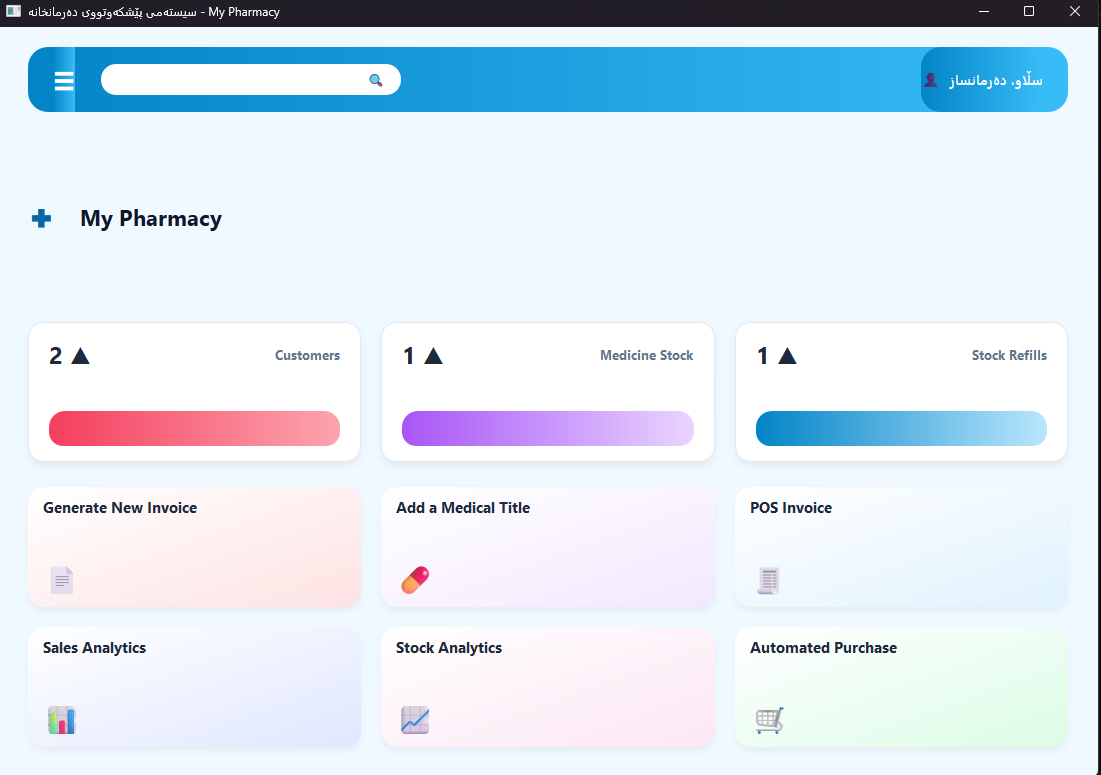
Modern Pharmacy POS & Inventory Management System (Single .EXE Portable App)
Instant plug-and-play desktop POS for Windows. Zero setup, 100% offline, with built-in webcam barcode scanning, FEFO tracking, multi-language, and multi-currency.
Overview / Description
Looking for a modern, reliable, and hassle-free pharmacy POS system without expensive subscriptions, databases to install, or messy dependencies?
My Pharmacy POS is packaged as a single, standalone .exe file. There is no installer, no extra software, and no setup required. Just download the file, double-click to launch, and manage your pharmacy immediately.
Key Features
- Single Executable (.EXE): Truly portable. Runs right out of the box from any folder or USB drive.
- Auto-Generating Database: The local database (
pharmacy.db) and settings configure automatically on your first launch. - Webcam & USB Barcode Scanning: Scan barcodes directly using your laptop’s built-in webcam or standard handheld scanner with instant recognition.
- Smart FEFO Logic (First Expiry, First Out): Automatically recommends and sells the oldest batches first to prevent expired medication waste.
- Box & Blister Strip Sales: Flexibility to sell full medicine boxes or individual strips with automatic fractional stock deduction.
- Thermal Receipt Printing: Fast receipt generation compatible with all standard 80mm ESC/POS thermal printers.
- Multi-Currency System: Works globally with USD ($), IQD, EUR (€), GBP (£), TRY (₺), SAR, AED, and more.
- Multi-Language (RTL & LTR): Full native interface support for English, Kurdish (کوردی), and Arabic (العربية).
- Custom Themes: Switch seamlessly between Modern Light Blue, Dark Mode, Emerald Green, and Royal Purple.
- Excel (.xlsx) Export & Backup: Export inventory and sales reports to Excel with one click, plus automatic database safety backups on exit.
What You Will Receive
PharmacyPOS.exe(Single standalone application file)
Download & How to Run (Instructions)
- Download:
Download the
PharmacyPOS.exefile directly after purchase. - Run the App:
Double-click
PharmacyPOS.exeto open the program.(Note: If Windows Defender SmartScreen displays a blue prompt on the first run, click More info and then choose Run anyway).
- Automatic Setup:
That’s it! The system automatically creates your local database and settings file in the same folder where the
.exeis located. No installation wizard, Python, or database servers needed. - Customize in Settings:
Click the menu icon (☰) in the top header bar anytime to pick your preferred language, currency, and theme.
System Requirements
- OS: Windows 10 or Windows 11 (64-bit)
- Hardware: Any modern PC or laptop (Dual-core CPU, 4 GB RAM)
- Camera (Optional): Integrated webcam or external camera if using camera barcode scanning
- immediately after checkout.
Purchase
In order to download this tool you must purchase it at or above the minimum price of $50 USD. You will get access to the following files:
Leave a comment
Log in with itch.io to leave a comment.